Learn about Simi
Settings
The Settings section allows you to manage your account information, customize your SIMI experience, control notifications, manage privacy options, and view application details.
Watch the video above to see the Settings section in action and learn more about how it works.
Profile
- The Profile section displays your account information, including:
- Your name.
- Email address.
- Current subscription or payment plan type.
- This provides a quick overview of your account details in one convenient location.

Appearance
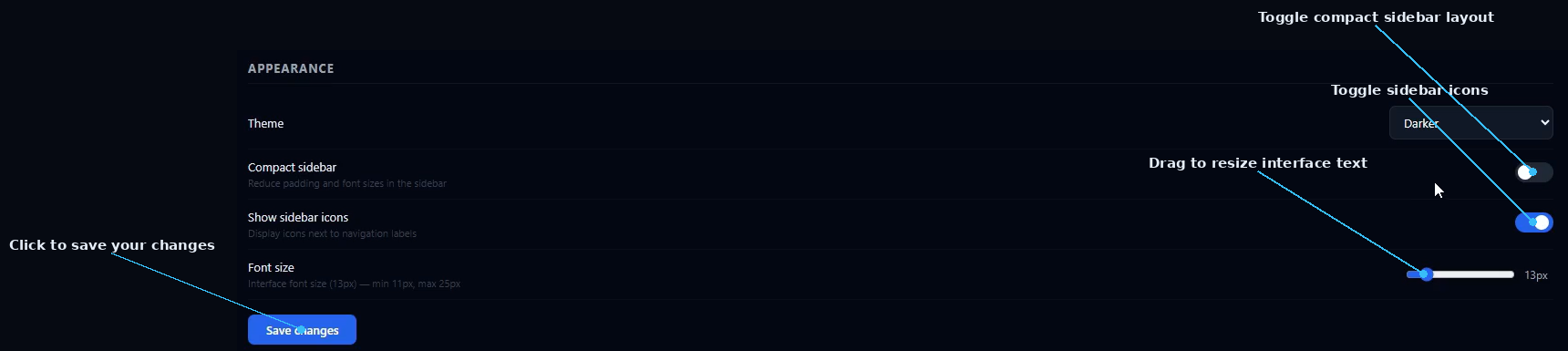
- The Appearance section allows you to customize the visual experience of SIMI. You can adjust:
- Theme — Choose your preferred background style from: Dark, Darker, Midnight, Slate.
- Compact Sidebar — Turn the compact sidebar option on or off depending on your preferred layout.
- Font Size — Adjust the text size to match your preferred viewing experience.
- After making your changes, click Save Changes to apply and save your new settings.

Notifications
- The Notification section allows you to control how you receive updates from SIMI. You can:
- Enable email notifications when agents complete long-running tasks.
- Turn error notifications on or off when agents encounter issues.
- Manage alerts to stay informed about important activities and system events.

Data & Privacy
- The Data & Privacy section allows you to manage your conversation data and local storage settings. You can:
- Enable chat history storage between sessions.
- Continue previous conversations when returning to SIMI.
- Click Clear Data to remove all locally stored application data.
- After adjusting your privacy settings, click Save Changes to apply the updates.

About
- The About section displays:
- The current version of the SIMI application.
- Release information for the version currently installed.
- This helps you quickly identify which version you are using.

Key Features
- Manage account information.
- Customize themes and interface settings.
- Adjust sidebar and font preferences.
- Control email and system notifications.
- Manage chat history and local data.
- View application version details.
Try Settings in SIMI
Explore Settings and the rest of SIMI's multi-agent workspace for yourself.
Explore SIMI