Learn about Simi
Chats
The Chats section is the command center of your SIMI workspace—where you interact with AI agents, manage conversations, and access powerful tools for sharing, securing, exporting, and deploying your chats. Designed for productivity and collaboration, this section helps you turn everyday AI conversations into organized, reusable, and actionable workflows.
Watch the video above to see the Chats section in action and learn more about how it works.
Overview
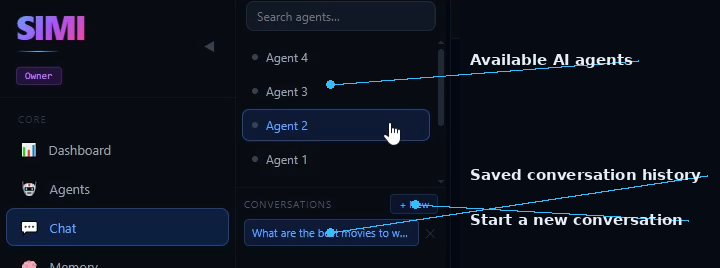
- The Chats section gives you a structured view of all available AI agents in your workspace.
- The Chats section displays all available AI agents.
- Each agent is designed for a specific purpose or workflow.
- Conversations are organized separately for each agent.
- This setup makes it easier to manage multiple tasks and projects efficiently.
- By keeping conversations separated by agent, SIMI helps you stay focused, reduce confusion, and maintain a clean workflow even when handling multiple projects at the same time.
Starting a Conversation
- Begin a new AI interaction in seconds.
- Select any AI agent to begin chatting.
- Type your question or prompt into the message box.
- Click Send to generate a response.
- Each agent generates responses based on its assigned configuration and model.
- This allows every agent to respond according to its specific role, model, and workflow, giving you more targeted and relevant results.
AI Responses
- SIMI is built to help you compare, evaluate, and choose the best AI output.
- Every response is generated based on the prompt you provide.
- Responses are well-structured and easy to read.
- Different agents may provide different answers to the same question depending on their configuration.
- This allows you to compare responses and choose the most suitable one for your needs.
- Comparing multiple AI perspectives can improve research, decision-making, content creation, and problem-solving.
Conversation History
- Never lose an important discussion.
- The left-hand panel displays all previously saved conversations.
- Conversation history is automatically stored within the SIMI app.
- You can reopen previous chats at any time.
- This makes it easy to continue past discussions without starting over.
- Your conversations remain organized and accessible, making long-term projects and ongoing workflows easier to manage.
Creating a New Conversation
- Keep topics separated and projects organized.
- Click the + New button at the top of the conversation panel.
- A new chat window opens instantly.
- Begin a fresh conversation with any selected agent.
- This helps keep different topics and projects organized.
- Starting a new conversation ensures that each task has its own clean context and history.
Sharing Conversations
- Collaborate across multiple AI agents with a single click.
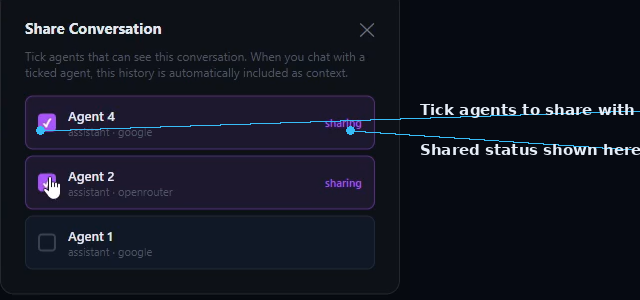
- Click the Share button in the top-right corner.
- A pop-up window appears showing all available agents.
- Choose which agents you'd like to give access to the conversation.
- Click Share to apply your changes.
- Only the selected agents will have access to the shared conversation.
- Note: The Share label updates (for example, Share 2) to confirm the conversation has been successfully shared with the selected agents.
- This makes it easier to reuse valuable discussions, compare insights, and extend conversations across different agents.

Locking a Conversation
- Protect sensitive information with password security.
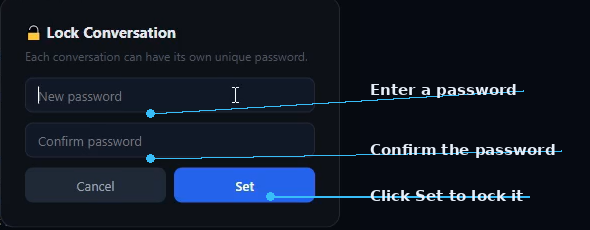
- Click the Lock button to secure a conversation.
- Enter a password.
- Confirm the password.
- Click Set to apply the lock.
- The conversation is now password protected.
- SIMI helps keep confidential discussions, business ideas, research, and personal information secure.
Accessing a Locked Conversation
- Security remains active even when navigating through the app.
- You can navigate to other sections of SIMI without affecting the lock.
- When you return to the locked conversation, a password prompt appears automatically.
- Enter the correct password to unlock and continue the conversation.
- This ensures your protected conversations stay secure until you choose to access them again.
Exporting Conversations
- Turn your AI conversations into reusable documents and data files.
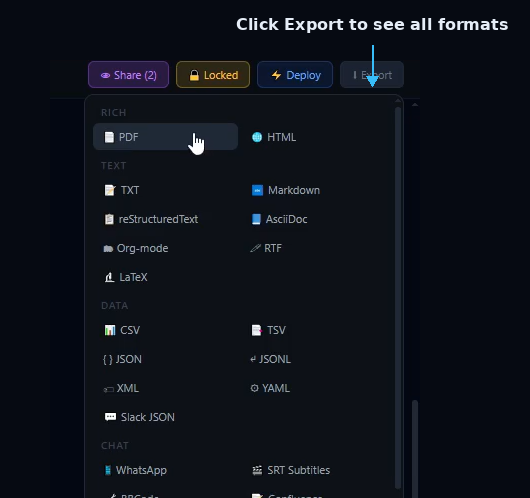
- Click the Export button.
- A pop-up window opens, listing every export format you can choose from.
- Select your preferred format.
- The conversation is downloaded directly to your Downloads folder.
- Supported formats: PDF, HTML, TXT, Markdown, reStructuredText, AsciiDoc, Org-mode, RTF, LaTeX, CSV, TSV, JSON, JSONL, XML, YAML, Slack JSON, WhatsApp, SRT Subtitles, BBCode, Confluence, and more.
- Exporting makes it easy to archive, share, analyze, publish, or integrate your AI conversations into other workflows.
Deploying a Conversation
- Transform a chat into an automated monitoring task.
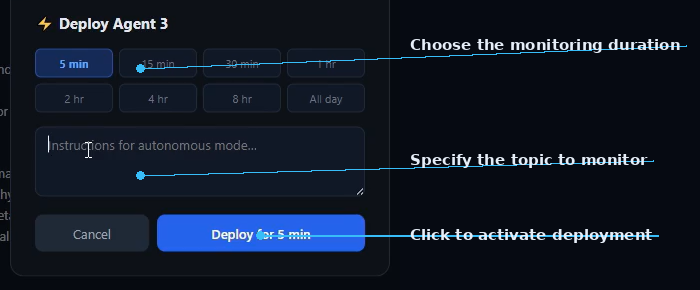
- Click the Deploy button.
- The deployment window opens.
- Choose the date and time for deployment.
- Specify the topic you want the agent to monitor.
- The agent can be configured to track live events, breaking news, market trends, sports updates, or other changing topics.
- Click Deploy to activate the scheduled task.
- The agent will automatically begin monitoring the selected topic at the scheduled time.
- This feature turns SIMI from a chat tool into an intelligent monitoring assistant that works for you in the background.
Key Features
- Chat with multiple AI agents.
- Automatically save conversation history.
- Start unlimited new conversations.
- Share conversations with selected agents.
- Protect sensitive chats with passwords.
- Export conversations in multiple formats.
- Schedule agents to monitor topics automatically.
Try Chats in SIMI
Explore Chats and the rest of SIMI's multi-agent workspace for yourself.
Explore SIMI