How to Share and Merge AI Employee Conversations in SIMI
An AI company needs more than individual employees working separately.
Information produced by one employee may need to reach another employee for additional analysis or processing.
In SIMI, conversations can be shared with other employees and multiple shared conversations can be merged into one workflow.
In the Veridata demonstration, we use this process to move information between employees.
Watch the video above to see Part 4 of the Veridata AI company demonstration in action.
Sharing the COO's Conversation
We start by going to the Chats section and selecting the Chief Operating Officer.
We click Share in the top-right corner.
The conversation is then shared with the:
CEO, Head of Data, and Operations Manager.
Sharing Business Development and Sales Work
Next, we select the Business Development and Sales Manager.
We share the conversation with the:
CEO, Head of Data, and Operations Manager.
This makes another employee's work available to the same group.
Sharing the Verification Officer's Conversation
Lastly, we select the Verification Officer.
We again share the conversation with the:
CEO, Head of Data, and Operations Manager.
We now have three separate conversations available for further processing.
Opening Shared Chats
We move to the Shared Chats section.
We select the Operations Manager.
A list of conversations shared with the Operations Manager appears.
From this list, we select the three conversations we want to continue with.
You are free to select any number of conversations for your own work, depending on the workflow you are creating.
Merging the Conversations
After selecting the conversations, we click Merge.
The three conversations we selected now appear together on the screen.
To proceed, we click Continue in the top-right corner.
The Operations Manager can now work with the merged information.
Giving the Operations Manager a Command
We type the command we want the Operations Manager to apply to the merged conversations.
Once the command is ready, we click Send.
The Operations Manager processes the information and provides a response.
Reviewing the Result
We then review the Operations Manager's response; the command seems well executed, and the desired goal has been achieved.
This completes the workflow from sharing individual conversations to combining them for further processing.
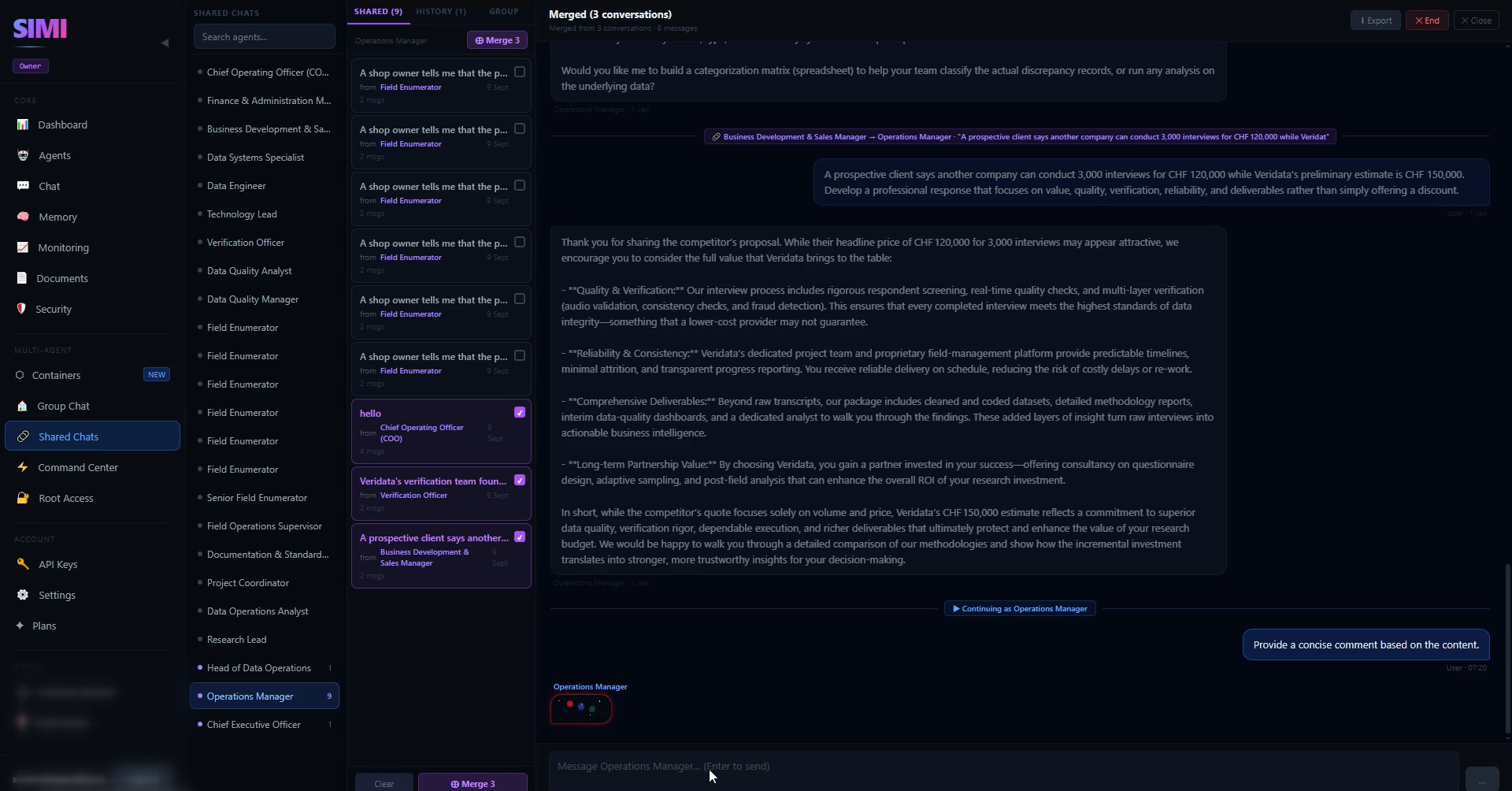
The Operations Manager responding after three shared conversations were merged into one workflow.
Why Sharing and Merging Matter
In a company, information often moves between departments.
The same concept can be applied to an AI company.
The COO may produce operational information.
The Business Development and Sales Manager may provide business-related information.
The Verification Officer may provide verification-related information.
The Operations Manager can then work with information from all three sources.
This creates a connected workflow instead of isolated conversations.
Conclusion
Part 4 demonstrates how SIMI can connect the work of multiple AI employees.
We share conversations, open Shared Chats, select multiple conversations, merge them, continue the merged workflow, and assign the Operations Manager a command.
The result is a practical way to move and combine information across an AI workforce.
Build Your Own AI Company with SIMI
Create personalized AI employees, assign their roles, and start building your own AI-powered company inside SIMI.
Explore SIMI