How to Use SIMI for Free: 2 Ways to Access AI Without Paying
AI has become incredibly powerful, but accessing multiple AI models can quickly become expensive. Here's how to build a surprisingly capable AI setup without paying for every model you want to use.
One service may charge for one model. Another may require a subscription. API usage can also become costly when you start experimenting with different models.
But there is another approach.
You can use SIMI's free tier together with free AI models running locally on your computer or limited free API access provided by AI companies.
This allows you to build a surprisingly capable AI setup without paying for every model you want to use. In this guide, we'll show you two practical ways to do it.
The two methods
- Method 1: SIMI + a locally running AI model
- Method 2: SIMI + free or limited API access from AI providers
Both approaches let you take advantage of SIMI's multi-model and agent capabilities while keeping your AI costs at zero, or close to zero, depending on the providers and usage limits you choose.
What Is SIMI?
SIMI is a collaborative AI platform that lets you connect AI models, create specialized agents, and bring those agents into different workflows.
Instead of using a single AI model for everything, you can create different agents for different jobs. For example, you could have:
- A research agent
- A coding agent
- A writing agent
- A reasoning agent
- A data-analysis agent
- A local AI agent
The advantage is that SIMI doesn't have to be the model itself. You can connect models from different providers and, in supported setups, even connect a model running directly on your own computer. That is what makes the free approach particularly interesting.
Method 1: Use SIMI With a Local AI Model
The first method is the closest thing to AI with no ongoing API cost. Instead of sending your prompts to a cloud provider, you run an open model directly on your computer.
One popular way to do this is Ollama. Ollama allows users to download and run open models locally. Its local API normally runs at localhost:11434, allowing other applications to communicate with the model.
SIMI can then connect to that local model.
How the setup works
The basic architecture looks like this. Your computer does the inference rather than a paid cloud API — meaning you aren't paying an API provider every time you send a prompt.
Step 1: Install Ollama
Download and install Ollama for your operating system. For example, on Windows, Ollama provides a dedicated installer and requires Windows 10 or later.
Step 2: Download a local model
After installing Ollama, you can download a model from its model library. For example:
Or you can choose another model that fits your computer. For computers with limited RAM, smaller models are generally easier to run — for example, Llama 3.2 is available in 1B and 3B versions, with the 3B version listed at about 2 GB in Ollama's library.
More powerful computers can run substantially larger models. Ollama also currently provides models such as gpt-oss, including 20B and 120B variants. The important thing is to choose a model your hardware can realistically handle.
Step 3: Connect Ollama to SIMI
Once Ollama is running, open the API Keys section in SIMI. Under Local / Self-Hosted, you'll find the Ollama connection.
You don't need a conventional paid API key for a model running locally — instead, SIMI connects to your local Ollama endpoint. Your setup can look like:
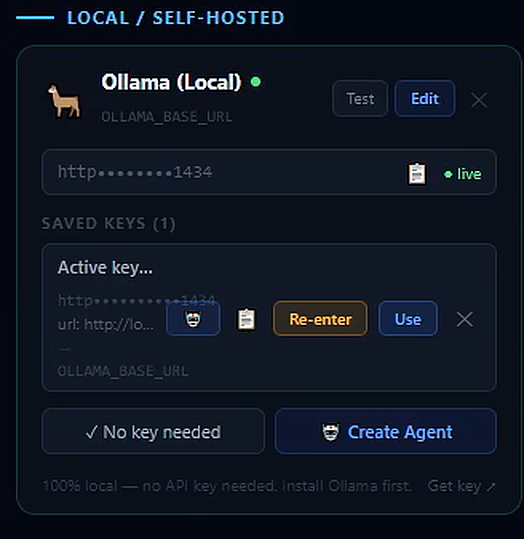
This is particularly useful because SIMI can become the layer through which you interact with your local model.
Why Use a Local Model With SIMI?
Running an AI model locally has several advantages.
No per-request API bill
Once the model is downloaded, inference happens on your own hardware.
More control
You aren't dependent on a cloud API for every interaction.
Useful for experimentation
You can experiment with different models without creating a separate paid API subscription for every model.
Greater privacy potential
Your prompts can remain within your local environment when the workflow is genuinely local.
Combine local and cloud models
You don't necessarily have to choose between local AI and cloud AI.
You can have: local model + free cloud model + another free cloud model → SIMI. That brings us to the second method.
Method 2: Use SIMI With Free API Keys
The second approach is to use SIMI's free tier together with free or limited API access offered by AI providers. Many AI companies offer developers some amount of free API access, free credits, or free inference with rate limits.
These offers change over time, so always check the provider's current terms before relying on a particular allowance.
- Google Gemini API — currently provides a free tier with free input and output tokens for eligible models, subject to model and rate limitations.
- Groq — publishes free-plan rate limits for its API, with limits varying by model.
- Cerebras — currently advertises a free trial with $5 in inference credits after creating an account.
- OpenRouter — provides free models, with its current free-model allowance subject to rate limits.
- NVIDIA API Catalog — currently advertises free serverless APIs for development, including models marked as free endpoints.
- Hugging Face — provides free monthly credits for its Inference Providers for free users, although the amount and eligible usage can change.
The important point is that "free API" normally means limited free usage, not unlimited usage.
How the Free API Method Works
Instead of running the model on your own computer, you obtain an API key from a provider that offers free or trial access. You then add that key to SIMI. For example:
The SIMI API Keys section is designed around this type of setup. You can add a provider, enter your credentials, test the connection, and then create an agent using the connected model.
You Don't Have to Use Only One Provider
This is where the setup becomes much more powerful. Imagine you have:
Powered by a model running through Ollama.
Powered through a free Gemini API allowance.
Powered through Groq's free API limits.
Powered through available Cerebras credits.
Powered through one of OpenRouter's currently available free models.
Now you can bring those agents together inside SIMI. Instead of asking:
you can ask:
Use SIMI's Multi-Agent Capabilities
This is where the free setup becomes more than just a collection of free AI accounts. You can create specialized agents and use them for different purposes. For example:
Finds and organizes information.
Analyzes the problem from another perspective.
Turns the research into readable content.
Handles tasks using your locally running model.
Critiques the output and identifies weaknesses.
You can then bring multiple agents into a collaborative workflow. The goal isn't simply to have more AI models. The goal is to make the models work together.
A $0 AI Workflow Example
Here's a simple example. Suppose you're writing an article. You could create:
- Local Ollama model — Generate initial ideas
- Free API model — Analyze the ideas
- Another free API model — Challenge the analysis
- Writing agent — Produce the final article
SIMI becomes the environment connecting those different agents. Your actual cost can remain $0 if you stay within the free allowances and use a local model for the workloads that would otherwise consume API credits.
Local AI vs Free API AI
| Local Model | Free API | |
|---|---|---|
| API payment | No | Usually limited free allowance |
| Internet required | Not necessarily | Yes |
| Uses your hardware | Yes | No |
| Setup difficulty | Moderate | Usually easier |
| Model selection | Depends on hardware | Depends on provider |
| Usage limits | Hardware limits | Provider limits |
| Privacy | Can remain local | Depends on provider |
| SIMI integration | Yes, through supported local providers | Yes, through supported API providers |
Neither method is necessarily better. They solve different problems. Local AI is excellent when you want control and don't want to consume cloud API quotas. Free APIs are useful when you want access to larger or specialized models without running them on your own computer.
The Best Approach: Combine Both
You don't have to choose one. In fact, combining them may be the most useful approach. For example:
Your local model can handle routine tasks. A cloud model can handle tasks where you need capabilities your computer cannot provide. Another provider can provide a second opinion. And SIMI can bring those agents together.
This gives you a hybrid AI workflow without requiring a paid subscription to every AI provider.
What Does "Free" Actually Mean?
There is an important distinction. When we say you can use SIMI for free, we're not saying that every AI model on the internet is free. Instead, there are several different layers:
- SIMI free tier
- Local models
- Provider free tiers
- = A potentially $0 AI workflow
However, cloud providers can change their pricing, rate limits, available models, and free allowances. For example, OpenRouter explicitly notes that free models have low rate limits, while its free-model pool can change.
Similarly, free API access from other providers can have request-per-minute, request-per-day, token, or credit restrictions. Groq, for example, publishes model-specific RPM, RPD, TPM and TPD limits. Always check the provider's current limits before building a workflow around a free allowance.
You Don't Need a Powerful Computer for Everything
One common misconception about local AI is that you need an expensive computer. You don't necessarily need one.
Smaller models can run on relatively modest hardware — for example, Ollama's library includes models in much smaller parameter sizes, including Llama 3.2's 1B and 3B variants.
The trade-off is that smaller models generally have different capability and performance characteristics than much larger models. If your computer struggles with a model, you can simply use a smaller model or let a cloud provider handle that particular task. That's another reason the hybrid approach works so well.
Start With What You Already Have
You don't need five AI subscriptions to start. A simple setup could be:
- Create a free SIMI account
- Install Ollama
- Download a local model
- Connect Ollama to SIMI
- Create your first local AI agent
Then, if you want additional models, create accounts with providers offering free API access and connect those providers to SIMI. Start small. Add models only when you actually need them.
Free AI Doesn't Have to Mean One AI
This is perhaps the biggest idea behind this setup. Most people think of free AI as:
A different approach is:
With SIMI, you can experiment with different models, create specialized agents, connect local AI, and combine different AI capabilities into a single workflow. You aren't locked into one model. And you don't necessarily need to pay for every model you want to experiment with.
Final Thoughts
You don't need a large AI budget to start experimenting with multi-model AI. There are two practical ways to get started with SIMI for free.
Option 1 — Local AI
Use SIMI's free tier with a model running locally through Ollama. Best for: privacy, control, experimentation and avoiding cloud API costs.
Option 2 — Free API access
Use SIMI's free tier with free or limited API allowances from AI providers. Best for: accessing cloud models without immediately paying for API usage.
Free AI doesn't have to mean using only one model. With the right setup, you can build a multi-model AI workflow around the resources you already have.
Best of both worlds: combine the two. Use local models for some tasks and free cloud APIs for others. Then use SIMI to bring those models and agents together.
Further Reading
For readers who want to explore the tools mentioned in this guide:
- Ollama — Run open models locally
- Google Gemini API pricing & free tier
- Groq API rate limits & pricing
- OpenRouter free models
Explore SIMI
SIMI provides a practical multi-agent environment where local models, free API providers, and paid providers alike can be organized into agents, giving users a way to build a real multi-model AI workflow around the resources they already have.
Build Your $0 AI Workflow
Connect a local model, add a free API key, and bring both into one collaborative workspace with SIMI.
Explore SIMI